AI emoji generator
An emoji maker for custom animated emoji: write a sentence and get the emoji, or upload a face and get a pack of six of your own expressions. Each one moves, with a clear background, ready for any chat.
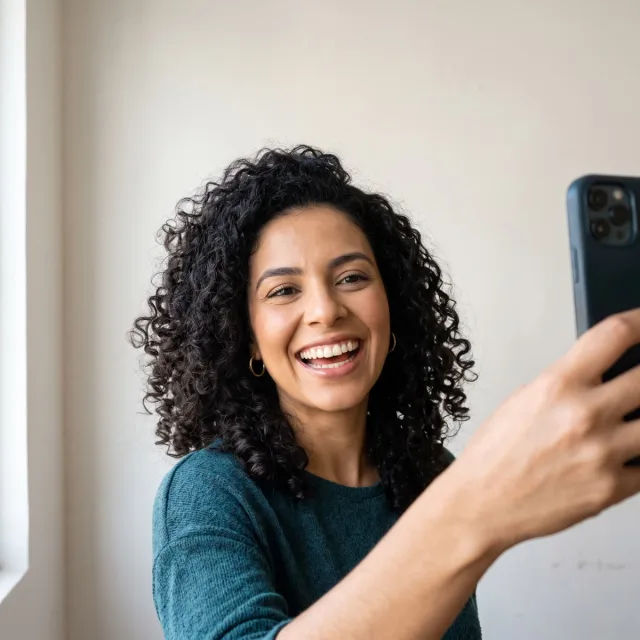 Her selfie
 Laugh
 Cry
 Angry
 Wow
 Wink
 Heart eyes
From a photoOne selfie, a pack of six: laughing, crying, angry, surprised, winking and heart eyes, the same face in every one.
Write a sentence, get the emoji
Eight emoji, one run each. Under each is everything we typed; the style and motion buttons did the rest. Tap Use these settings to make your own version.
 3DHeart eyes
a cat drinking coffee, happy
 FlatWink
a taco wearing sunglasses
 StickerNod
a sleepy sloth hugging a pillow
 PixelWave
a cactus giving a thumbs up
 3DWow
a nervous avocado, sweating
 FlatLaugh
a ghost holding a birthday cake
 StickerLaugh
a planet wearing a party hat
 3DWave
a frog in a yellow raincoat, waving
Every one is the first run of its sentence, nothing redrawn or retried, and none added words we didn’t ask for. The movement is small, like a real emoji: the frog lifts its hand, the avocado’s mouth drops open, the ghost and the planet shake with laughter.
How do I make my own emoji?
Type what you want, like “a cat drinking coffee, happy”, or upload a face, pick what it should do and press Generate. In about a minute you get a looping GIF with a clear background, plus a still PNG. One emoji is 13 credits; a matching pack of six from a photo is 78.
- 1
Type it or upload a face
A sentence works for anything: food, animals, objects with feelings. For your own face or your pet, one clear photo looking at the camera.
- 2
Pick a motion and a style
Wave, laugh, heart eyes, angry, cry, wow, wink or nod. Then 3D, Flat, Sticker or Pixel, or keep your photo’s own look.
- 3
Save it for your chat
Download the GIF, or a still PNG. Sized for Discord, Slack or Twitch makes it the size that app asks for, at no extra cost.
Turn your photo into an emoji, six ways
One selfie in, a matching pack of six out: 78 credits keeping your own look, 84 in a style. A pack takes 2 to 6 minutes, and you watch each one arrive.
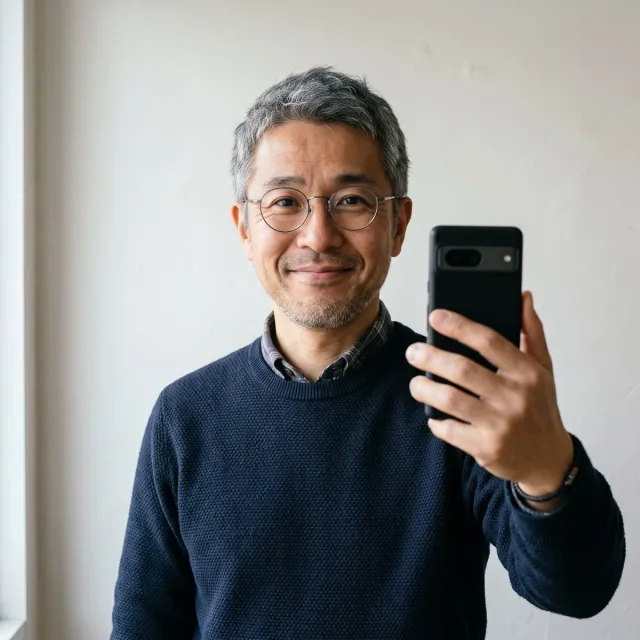 The selfie
 Laugh
 Cry
 Angry
 Wow
 Wink
 Heart eyes
Sticker style. His round glasses are in all six, even around the heart eyes, and the phone from his selfie stays in his hand when he laughs, gasps, winks and falls in love. Crying brings tears, angry brings steam.
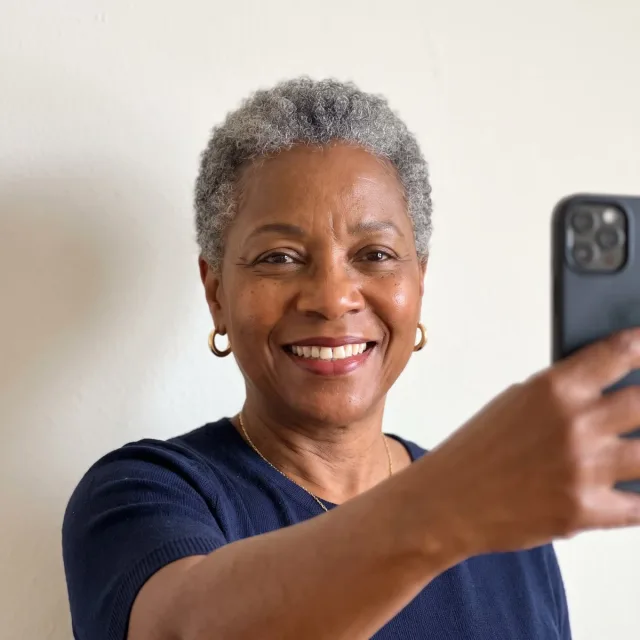 The selfie
 Laugh
 Cry
 Angry
 Wow
 Wink
 Heart eyes
Keep the look: no style, just her. The short gray hair and gold earrings are in all six. Angry puffs little clouds by her ears, heart eyes take the place of her own, and she bobs when she laughs.
Use a photo of yourself, or of someone who said yes. A plain wall behind you and your whole face in the frame give the closest likeness.
Your cat as an emoji
Pets work the same way as faces: upload one photo where you can see the eyes, and get six expressions of your own cat or dog.
Ours is a ginger tabby. Its green eyes and stripes stayed in all six: eyes squeezed shut for laughing, streaming blue tears for crying, a red mark and steam for angry.
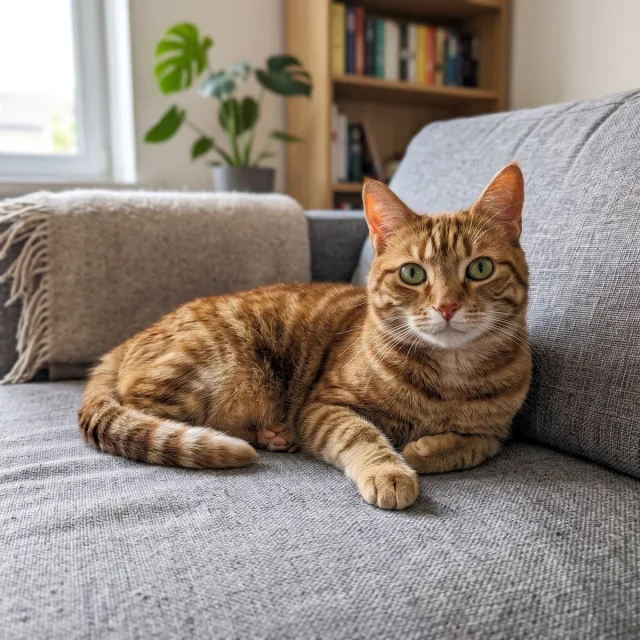 The photo
 Laugh
 Cry
 Angry
 Wow
 Wink
- Heart eyes
who ate the last slice of cake
not me
3 1A Discord emoji maker for your server
Make a set of your friends’ faces, your cat or your inside jokes, and add them as server emoji that move. Press Sized for Discord under your emoji and you get a 128 px GIF that fits Discord’s 256 KB limit.
To add one on Discord, open Server Settings, then Emoji, and press Upload Emoji. You need to own the server or have the Manage Emojis or Create Expressions permission. Name it with letters, numbers and underscores, like :ana_lol:.
On Slack, press the smiley in the message box, choose Add Emoji, then Upload Image, give it a name and save. On Twitch, animated emotes are for Affiliates and Partners; Sized for Twitch gives you the 112, 56 and 28 px GIFs in one ZIP.
Discord, Slack and Twitch emoji sizes
What each app asks for, and what the Sized for buttons download. You never resize anything yourself.
| App | What the app asks for | What you download |
|---|---|---|
| Discord | Under 256 KB, as JPEG, PNG, GIF or WEBP. Names of at least 2 letters, numbers or underscores. 50 still emoji per server. | A 128 px GIF under 256 KB |
| Slack | Square images under 128 KB with a transparent background work best, as JPG, PNG or GIF. GIFs up to 50 frames. | A 128 px GIF under 128 KB |
| Twitch | Square GIFs, 60 frames at most, nothing flashing more than 3 times a second. One file of 112 to 4096 px up to 1 MB, or three of 28, 56 and 112 px up to 512 KB each. | A ZIP of 112, 56 and 28 px GIFs, each under 512 KB |
From each app’s help page, read November 2026. How many animated emoji a Discord server holds depends on Nitro: look at your server’s Emoji tab.
An AI emoji generator, or another way?
If you already have the pictures and just want them in one looping GIF, you don’t need us: Photo to GIF does that free in your browser.
| Way | Best for | Moves | What it takes |
|---|---|---|---|
| This emoji generator | Your own face, pet or idea, as a pack of six that match | Yes, every one | 13 credits an emoji, about a minute |
| Photo to GIF | Pictures you already have, shown one after another | As a slideshow | Free, in your browser |
| Apple Genmoji | A quick emoji inside Apple’s own apps | No | An Apple device that supports it |
| Hiring an artist | A hand-drawn set in one exact style | If you pay for it | Days, and a fee per emoji |
Custom emoji: your questions
About photos, pets, chat apps, backgrounds and credits. Plans and refunds are on the pricing page.
How do I make my own emoji?
Type what you want or upload a face, pick what it should do and a style, and press Generate. In about a minute you get a looping GIF with a clear background, plus a still PNG. One emoji is 13 credits, or 19 when a photo is redrawn in a style first.
Can I turn my photo into an emoji?
Yes. Upload one selfie looking at the camera and pick Pack of 6: you get the motion you chose plus five more, from laughing and crying to heart eyes, the same face in every one. Glasses, hair and earrings carried over in ours. A pack is 78 credits keeping your look, 84 in a style, and takes 2 to 6 minutes.
Can I make an emoji of my cat or dog?
Yes, the same way as a face: one photo where you can see the eyes. Our ginger cat kept its green eyes and stripes in all six expressions, crying blue tears and steaming when angry.
Can I use them on Discord or Slack?
Yes. Press Sized for Discord or Sized for Slack under your emoji and you get a 128 px GIF that fits that app’s limit: 256 KB for Discord, 128 KB for Slack. On Discord, upload it under Server Settings → Emoji; on Slack, choose Add Emoji in the emoji menu.
Do I need Discord Nitro for animated emoji?
Not to upload one: whoever owns the server, or has the Manage Emojis or Create Expressions permission, can add it. Discord’s help page ties animated emoji slots to Nitro, so look at your server’s Emoji tab to see how many it has free.
Can I make Twitch emotes?
Yes. Twitch animated emotes are for Affiliates and Partners, and must be square GIFs of 60 frames at most with nothing flashing more than 3 times a second. Sized for Twitch downloads the 112, 56 and 28 px GIFs in one ZIP, each under 512 KB.
Is the background transparent?
Yes, in the GIF and the PNG, so each emoji sits clean on a dark or light chat. Now and then a pale rim stays around fur or hair; making that one again fixed it every time in our tests.
Can it make animated emoji?
Every one moves: a short loop, like a real emoji. Pick wave, laugh, heart eyes, angry, cry, wow, wink or nod. If you want it still, download the PNG.
Is it the same as Genmoji?
No, it’s our own emoji maker. It works in any browser, on any phone or computer, its emoji move, and you download them to use wherever you like.
Is the AI emoji generator free?
Confirm your email and you get 43 free credits, enough for 3 emoji from a sentence. After that each one is 13 credits, and a failed one gives its credits back.
Who owns the emoji I make?
You do: our Terms say the pictures you make stay yours. Don’t make pictures of real people without their consent, and only start from photos you have the right to use.
Whose face goes in the set first?
Your first 3 emoji from a sentence are free once you confirm your email. After that each one is 13 credits, and a failed one gives its credits back.