Earth zoom out
Start on you, pull back over the street, the city and the clouds, and end on the whole Earth. One photo, about a minute, no editing.
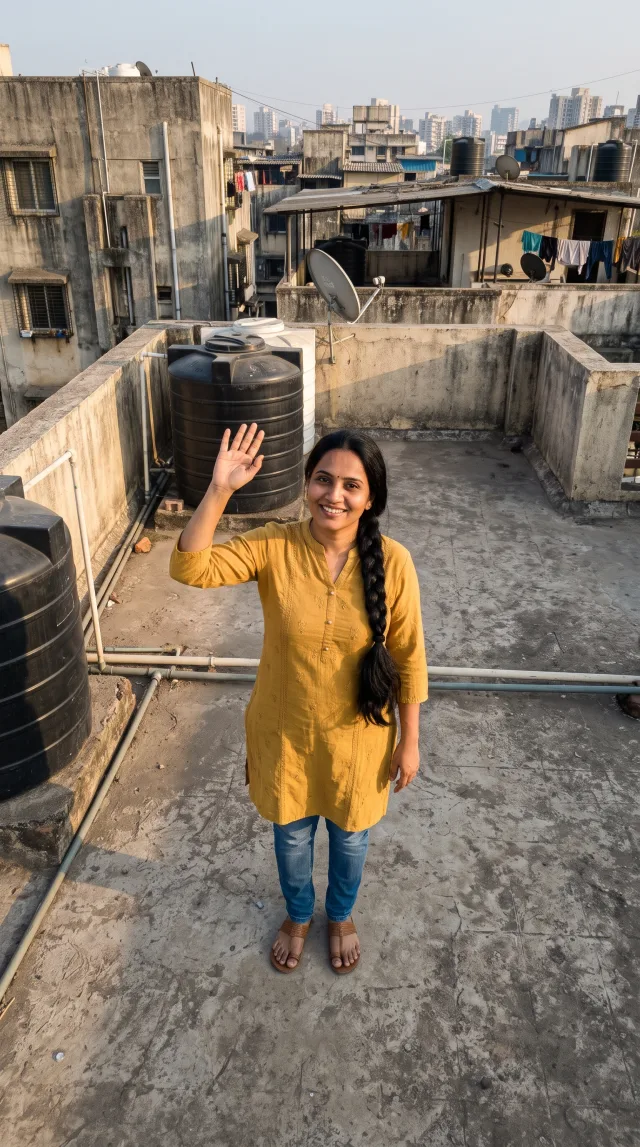
Earth zoom outOver the city · “The person waves. The camera pulls straight back and up, slowly at first then faster: from them, over the rooftops and streets, the whole city, the coastline and the clouds, out to space until the whole Earth is in view against black space.”
 MiniMax H3
Which photos pull back the furthest
An earth zoom out effect starts on your photo, so the photo decides how the AI earth zoom begins. We tried four outdoor photos; all four made it to the whole Earth.
A rooftop, shot from a little above
Rooftops all around give the camera layers to climb past.
Our run: she waved, then rooftops, the city, the coast and the clouds fell away. The planet it ended on faced the Americas, not India: the way up is imagined, not a map.
Shot straight down
A photo taken from directly above is already looking the way the camera will travel.
Our run: she raised her spatula, then the food truck, the parking lot and the streets shrank into clouds and the globe.
A group, looking up
Everyone waving at a camera held up high makes a strong first second.
Our run: the family waved, then the picnic table, the backyard and the neighbourhood dropped away through the clouds. Ours took 47 seconds, the longest of the batch.
Wide open land
Two people on a salt flat, nothing in the way. Big landscapes give the cleanest climb.
Our run: the two of them shrank to a dot, the mountains came into view, then the clouds and the planet.
At a desk, in a bedroom
Within the first second the room was gone and a city seen from above had taken its place: no pull back through the window. It ended on a curved close-up of the Earth rather than the whole globe.
Indoor photos lose the room
We tried a photo taken inside, at a desk, with the short sentence anyone would type.
Go outside
The pull-back needs open air above you. A rooftop, a yard, a beach or a car park all work.
Hold the phone up high
A photo taken from a little above, or straight down, already points the way the camera goes.
Look up and wave
A face turned up to the lens gives the clip a first second worth leaving.
If a clip fails or our safety check stops it, the credits go back to your balance on their own.
How to make an earth zoom out video
Add an outdoor photo, pick 5 or 8 seconds, and press Zoom out to space. The camera pulls back from you over the streets, the city and the clouds to the whole Earth. The streets and the planet on the way up are made up to look right, not taken from a real map. Our 5-second runs took 31 to 47 seconds.
- 1
Add an outdoor photo
You, outside, ideally shot from a little above. Rooftops, yards, beaches and open land all climbed to space in our runs.
- 2
Pick the length
Under Settings, MiniMax H3 makes 5 seconds for 43 credits. Veo 3.1 Fast makes 8 seconds for 160.
- 3
Zoom out to space
Press the button and the earth zoom AI does the rest. You get an MP4 with sound; if the clip fails or is blocked, the credits come back on their own.

5 seconds or 8 seconds?
The same rooftop photo and the same sentence, once with each model, so you can see what the extra three seconds buy.
5 seconds · MiniMax H3
43 credits.
Our run: rooftop, city, coast, clouds, then the whole planet, in 39 seconds of waiting.
8 seconds · Veo 3.1 Fast
160 credits.
Our run, 102 seconds of waiting: she waved, then two fast, blurred jumps carried it over the city, the coast and the curve of the Earth to the whole planet by about 5.5 seconds. In the last two seconds the camera drifted back in, so the final frame crops the globe, and the sound was faint.
Choose the Earth it ends on
With one sentence, the planet at the end is whichever side the clip picks. Give it a last frame and it lands exactly there.
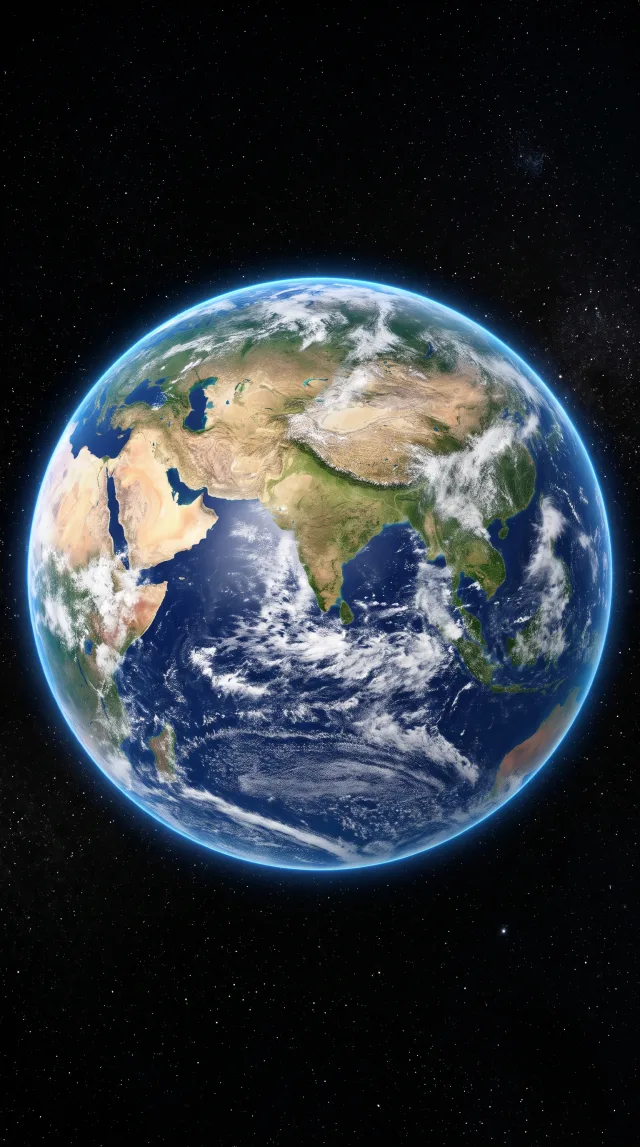 Your photo + the last frameEnds on that Earth
From the same rooftop in Mumbai, one sentence alone ended on the Americas. With a picture of the Earth showing India as the last frame, our run made the same climb and landed on that picture, then held still on it for the last second and a half.
The last frame is set in the Studio: open Create, add your photo, then add the Earth picture under Last frame.
After Effects or AI?
If you searched how to do an earth zoom out shot in After Effects, or a Google Earth zoom out, here’s how that compares with making one from a photo.
| Compared | After Effects or Google Earth Studio | From one photo here |
|---|---|---|
| What you start with | Your footage plus real map imagery | One photo |
| The ground you fly over | Real places, on a real route | Made up to look like the place; not a map |
| The work | Keyframing the camera and blending your shot into the map | Pick a sentence and wait; ours took 31 to 47 seconds |
| Pick it when | The route has to be true: a real address, a real trip | You want the moment, quickly, from your phone |
Zoom in from space instead
An AI zoom out played backwards is a zoom in: from the whole Earth down to you.
Under your clip, tap Backwards. It saves a copy that starts on the whole Earth and falls back down to your photo, free, with nothing to upload again. Want both ways in one clip? Tap Also make one that goes there and back: out to space, then down to you.
You can also try it the other way round in the Studio, with the Earth picture as the first frame and your photo as the last. We haven’t run that yet, so we can’t show you how it lands.
Earth zoom out: your questions
About photos, length, maps and privacy. Plans and refunds are on the pricing page.
Can I make an earth zoom out for free?
Your first clip, yes. Confirm your email and the first 5-second clip is on us, and it has no watermark. After that it’s 43 credits for 5 seconds, and a failed clip costs nothing.
Does it show my real street?
No. The rooftops, streets and coast on the way up are made up to match your photo, and so is the side of the planet you end on: our Mumbai rooftop ended on the Americas. For a real route, use a map tool.
Can I zoom in from space instead?
Yes. Make the zoom out, then tap Backwards under the clip: you get a copy that falls from space down to you, free. One more tap makes one that goes out and comes back. The backwards copies have no sound.
Can it be longer than 5 seconds?
Yes. Pick Veo 3.1 Fast under Settings for 8 seconds, at 160 credits instead of 43.
Why did it stop at the clouds?
None of our outdoor runs did, but a clip can run out of time on the way. Name the end in your sentence (“until the whole Earth is in view”), pick 8 seconds, or give it an Earth picture as the last frame in the Studio.
Does it work with an indoor photo?
Not well. In our desk photo the room vanished in the first second and a city appeared in its place. Take the photo outside, from a little above.
Can I add music or text?
The clip comes with its own sound, and you can describe it in your sentence. For a song or captions, add them in your usual editing app after you download the MP4.
Who can see my photo and the zoom-out clip?
Only you. The zoom-out clip and your photo are kept in My Creations for at least 30 days, and one click there deletes them earlier. We never train models on them.

From your photo to the whole planet
One outdoor photo, 5 or 8 seconds. 43 credits for 5, and a failed clip costs nothing.