
Grok Imagine image to video
xAI’s Grok Imagine on your own photo, no X account needed: a 6-second clip with sound for 33 credits. Cheap enough to try three ideas and keep the one you like.
Grok Imagine
What is Grok Imagine?
Grok Imagine is xAI’s maker of pictures and videos. Its video side brings a still photo to life from a short sentence, sound included. xAI puts it as: “Bring an image to life, start from a simple text prompt”.
Here you use it without an X or Grok account. Upload a photo, say what should happen, and get a 6-second MP4 with sound: 33 credits at 480p, 60 at 720p. It is one of the cheapest clips on the site, which makes it the one for trying a few ideas on the same photo.
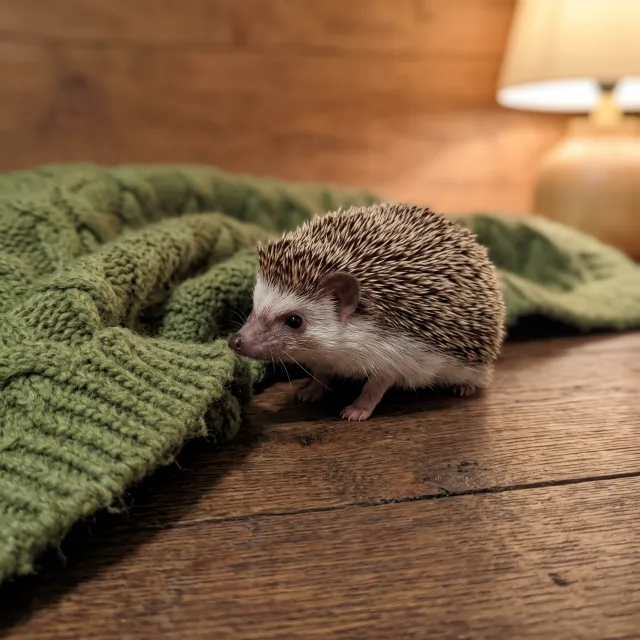
A hedgehog that curls up and peeks out
A small hedgehog sniffing the edge of a green knitted blanket. We asked for it to trundle forward, curl half into a ball and peek back out, with soft snuffling to go with it.
In our run it sniffed along the blanket and curled up, but rolled onto its back with its pink paws in the air instead of peeking out of a ball. The spines and the knitting kept their shape.
Animate my pet
Brown sugar milk tea on the counter
One cold cup on the counter of a small tea shop. The sentence asks for the syrup to slide down the inside of the cup, the pearls to settle and a straw to pop through the lid, with ice clinking.
Our photo already had a straw in the lid, so nothing popped through. What we got was a slow push-in on the cup: the syrup streaks shifted a little and the cup and lid kept their shape. Start from a cup without a straw if you want that moment.
Move my menu photo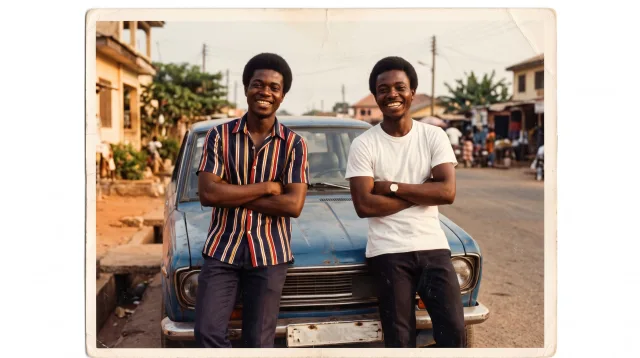
Two brothers on an old blue sedan
A faded snapshot of two brothers leaning on the family car, arms crossed. We asked for them to turn to each other, laugh and bump fists while a breeze moves their shirts and car horns sound far off, keeping the faded colour.
In our run they pushed off the car, turned to each other laughing and bumped fists about four seconds in. Both faces stayed theirs, and the faded colour and the white print border held to the last frame.
Bring an old photo backHow do you use Grok Imagine on a photo?
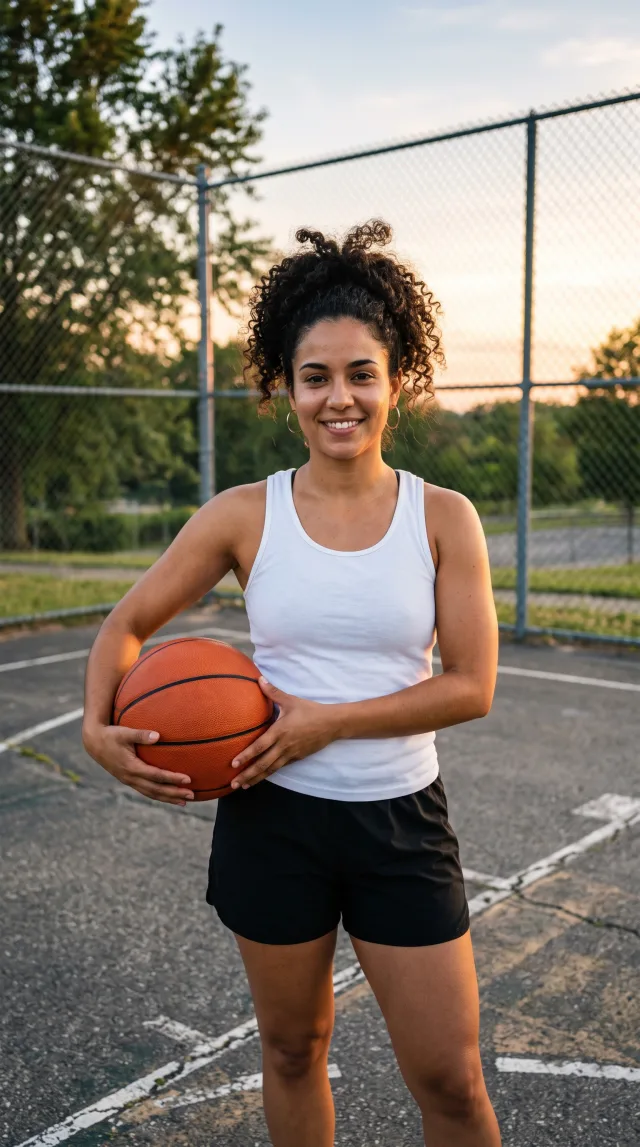
One basketball photo goes through every step. Upload it, write one simple action and a sound, pick 480p or 720p, and keep the MP4.
- 1
Upload a photo
Grok Imagine works from a photo or from words alone. Add one photo in the box above; it opens the clip. To start from words only, use Create.
- 2
Write one action and a sound
One clear move works better than a sequence: a spin, a shot, a wink. Add the sound you want after it.
- 3
Pick 480p or 720p
Each clip is 6 seconds with sound. 480p is 33 credits and 720p is 60. The box starts on 480p, so trying ideas stays cheap.
- 4
Keep the one you like
Download the MP4 or find it in My Creations for 30 days. If a clip fails or is blocked, its credits come back on their own.
One photo, three sentences
Same court, same player, three ideas at 480p. Three tries cost 99 credits in all.
Spin the ball
She spins the ball on one finger and grins.
Ours, 45 seconds: the ball spun on her fingertip for about three seconds, then dropped, bounced and she caught it. Her face and earrings held.
Take the shot
She dribbles twice and shoots, the ball swishes through the hoop off-frame.
Ours, 55 seconds: two dribbles, then the clip jumped to a new angle with the hoop in view, and the ball went in on screen rather than off-frame. After the cut her face looked less like the photo.
Walk up and wink
She tucks the ball under her arm, walks toward the camera and winks.
Ours, 55 seconds: ball under her arm, a walk toward the camera and a wink near the end. Her face held as it filled more of the frame.
To compare with those three tries, one Seedance 2 clip costs 173 credits.
No photo? Write one sentence
Grok Imagine can also make a clip from words alone. We wrote one line and nothing else: “A paper boat floats down a rain gutter past fallen leaves, water splashing.”
Use words alone when the scene matters more than whose it is: a background, a mood, an opening shot. It costs the same 33 credits at 480p and is made in Create. When it has to be your dog, your shop or your grandparents, start from the photo.
Ours took 53 seconds: a white paper boat drifting and turning in a wet gutter among orange leaves, with raindrops splashing and more leaves falling in.
Same photo: Grok Imagine and MiniMax H3
A couple sharing one pair of wired earphones on their front steps. Same sentence on both, sound on.
Grok Imagine at 480p
33 credits · 6 seconds · with sound.
Our run, 56 seconds: they nodded along, she leaned her head on his shoulder and he closed his eyes and smiled. The wired earphones stayed in both their ears to the end, and both faces held. In this scene Grok kept the earphones and H3 did not.
MiniMax H3 at 768p

43 credits · 5 seconds · with sound.
Our run, 38 seconds: she leaned her head on his shoulder and he tapped the beat, with both faces unchanged, but the earphones left their ears after the first second.
OpenGrok Imagine makes pictures too
xAI uses the Grok Imagine name for still images as well as video. This page only makes video.
Still pictures
Pick Grok Imagine in the AI Image Generator and describe the picture you want.
OpenMoving clips
Stay here: the box at the top makes 6-second clips with sound from your photo, from 33 credits.
Can you try Grok Imagine for free?
Your free credits are for one clip on a different model. A Grok Imagine clip costs fewer credits than that free clip, but the free credits can’t be spent on it.
Grok Imagine questions
Is Grok Imagine free?
Not here. A Grok Imagine clip is 33 credits at 480p. The credits you get for confirming your email (43) pay for one MiniMax H3 clip, and only that, though it has sound too.
Do I need an X account to use Grok Imagine here?
No. Sign in with your email or with Google. You don’t need an X account, a Grok account or the Grok app.
Can Grok Imagine make a video from text alone?
Yes. Open Create, pick Grok Imagine and write the scene without adding a photo. It costs the same 33 credits at 480p.
How long is a Grok Imagine clip here?
Six seconds, every time. xAI’s own documentation describes a “configurable duration (up to 15s)”; on this site the length is fixed at 6.
Is 720p worth the extra credits?
480p is 33 credits and 720p is 60. We ran the spinning-ball photo at both: the 720p clip was sharper and the ball stayed up a little longer before it fell, but the move was much the same. It took 54 seconds against 45 at 480p. A 720p run is a new clip, not a sharper copy of the 480p one: ours ended with the ball bouncing away instead of being caught.
Who makes Grok Imagine?
xAI. We run its video model on this site; AnimatePhotos isn’t part of xAI.
Can I make still images with Grok Imagine here?
Not on this page, which only makes video. Go to the AI Image Generator and pick Grok Imagine there.
Why did my clip come out different from what I asked?
One simple action holds up better than several in a row, especially at this price. Cut the sentence down to one move and run it again. If a run fails or is blocked, the credits come back by themselves; a finished clip that missed is not refunded.
Other models and pages





Try three ideas on one photo
A 6-second Grok Imagine clip with sound is 33 credits at 480p. Failed clips give the credits back.