
Veo 3.1 Fast image to video
Google’s Veo 3.1 Fast on your own photo: 8 seconds at 720p with sound made to match. We run the Fast version, and say so.
Veo 3.1 Fast
What is Veo 3.1?
Veo 3.1 is Google’s video model that makes short clips with sound, from a photo or from a few words. AnimatePhotos runs Veo 3.1 Fast, the quicker version Google offers alongside it.
You upload a photo, describe what happens and what we should hear, and get an 8-second 720p MP4 with music, a voice or the sound of the place made along with the picture. From one photo it is 160 credits; from words alone, or from a first and a last photo, it is less than half that.
A trumpet solo that echoes down the tunnel
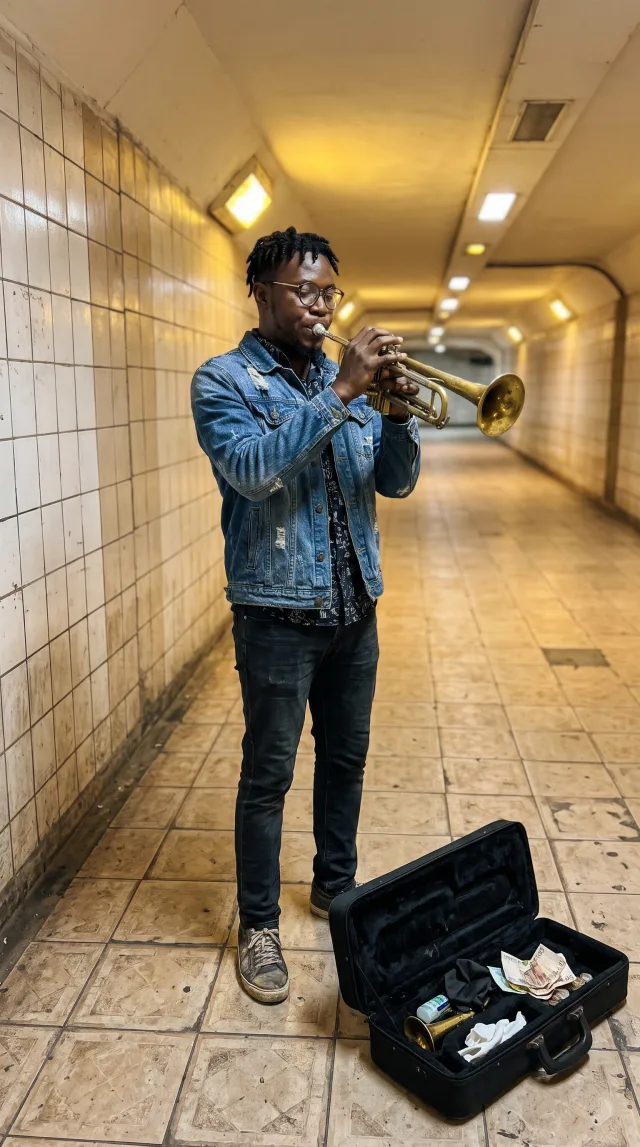
One photo of a busker mid-note in a tiled walkway. The sentence asks for a short upbeat phrase, cheeks puffing, and the tune bouncing off the tiles, so the clip carries its own soundtrack.
In our run he played for about five seconds, dipped the horn once mid-phrase, then lowered it as the music faded out. His face and glasses stayed as in the photo.
Add sound to my photo
A shop owner who greets you from the counter
A hardware store owner leaning on her counter. We put the words she says in quotes, “Come in, we’re open till eight,” and asked for a shop bell and a radio behind her: a greeting for the shop’s page or stories.
In our run she said the line clearly in the first two seconds, her lips moving with the words, then smiled and rubbed her hands together instead of tapping the counter.
Make my shop say hello
Five geese rushing in for grain
Feeding time in a muddy yard, caught as one still. We asked for the geese to rush in honking and flapping, her to laugh and throw another handful, and the boots to squelch in the mud.
Our run had the honking, the flapping and her laugh, but not a clean count: in the flurry the five geese blurred into each other and looked like more, and her tin bowl disappeared halfway.
Bring my yard to lifeHow do you turn a photo into a Veo 3.1 clip?
The busker photo runs through all four steps: upload it, describe the sound as well as the motion, check the price, and save the MP4.
- 1
Upload one photo
Veo 3.1 Fast can start from one photo, two photos or just text. In the box above you add one photo, and it becomes the opening frame of the clip. Two photos or words alone work in Create.
- 2
Describe the motion and the sound
Say what moves, then what we hear: a tune, a line in quotes for someone to say, rain, traffic. The sound follows your words.
- 3
Make it with Veo 3.1 Fast
Every clip is 8 seconds at 720p, with sound, for 160 credits from a photo. That number is on the button before you press it.
- 4
Save it
Download the MP4 or come back to it in My Creations for 30 days. A clip that fails or gets blocked returns its credits by itself.
Veo 3.1 and Veo 3.1 Fast: what runs here
Google offers Veo 3.1 in more than one version. We run the Fast one, and we haven’t compared it against the full version, so this is only what each offers.
Veo 3.1
a model for generating 8-second videos (720p, 1080p, or 4k) with natively generated audio
Google’s own description of Veo 3.1. Clips of 1080p and 4k are made on Google’s side, not here.
Veo 3.1 Fast
create videos with sound while maintaining high quality and optimizing for speed
Google on its Fast versions. This is the model behind the box on this page: 8 seconds, 720p, with sound.
Three kinds of sound from three photos
Music, a voice and the noise of the weather. Each card shows the sentence we wrote, so you can see how the sound was asked for.
Music
He plays a short upbeat jazz phrase, cheeks puffing, body swaying; the tune echoes in the tunnel.
A jazz phrase played while he did, and faded out as he lowered the trumpet.
A voice
She looks up and says warmly, “Come in, we’re open till eight,” then taps the counter. Shop bell and a radio in the background.
She said every word clearly in the first two seconds. We couldn’t pick out a shop bell.
Rain and wind
Rain pours and drips off the railing, the wind chime clinks, the chili leaves shake.
Rain hissed the whole way, and the loudest sound came as the chime swung hardest. The chili leaves barely moved.
Same photo: Veo 3.1 Fast and MiniMax H3
Both make sound. We gave the busker photo the same sentence twice, sound on both times.
Veo 3.1 Fast
160 credits · 8 seconds · 720p.
Our run, 107 seconds: he played for about five seconds, dipped the horn once, then lowered it and stood still while the music faded. His face, glasses and case stayed as in the photo.
MiniMax H3

43 credits · 5 seconds · 768p.
Our run, 39 seconds: he played and swayed a little the whole way, the trumpet tipped once, and his face, glasses and open case stayed as in the photo. A full music track ran under it.
OpenFrom a photo, from words, or from two photos
The price depends on what you start from. Same rainy balcony, once from the photo and once from a sentence, plus a kettle made from two photos.
From your photo
160 credits. The clip opens on your exact balcony, plants and rooftops, then moves.
From words only
A small apartment balcony in heavy rain, potted chili plants and a hanging bamboo wind chime, wet railing, grey city rooftops behind.
Less than half the photo price. You get a balcony that fits the words, not yours.
Our run, 168 seconds: close on one chili plant, the chime half out of frame and tiled roofs behind, with steady rain. Wet and rainy, but not your rooftops.
 Two photos
From a first and a last photo
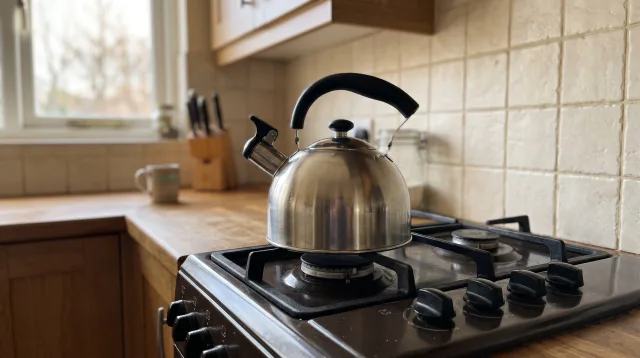
Also less than half the photo price. A quiet kettle at the start, a whistling one with the flame on at the end.
Our run, 166 seconds: the burner lit blue, steam burst from the spout and it ended on the second photo, with a loud whistle near the end.
Want your exact photo? Start from the photo. Fine with a scene that matches your words? Start from text in Create.
Can you use Veo 3.1 for free?
The free credits pay for one clip on a different model, and that one has sound too.
Veo 3.1 questions
Is this Veo 3.1 or Veo 3.1 Fast?
Veo 3.1 Fast. It is the quicker version Google offers next to Veo 3.1, and it makes 8-second clips with sound. We haven’t run the full Veo 3.1 here, so we don’t claim one looks better than the other.
Is Veo 3.1 free?
Not on this site. A Veo 3.1 Fast clip from a photo is 160 credits, and less than half that from text or two photos. Your free credits (43, for confirming your email) cover one MiniMax H3 clip, which also has sound.
Can people in my photo talk?
Write the words in quotes and say who says them, as in “She looks up and says warmly, ‘Come in, we’re open till eight.’” In our store run she said the whole line clearly in the first two seconds, with her lips moving along.
Why does a photo cost more than text?
Keeping your photo as the exact opening frame takes a costlier Veo run on our side. From words or from two photos, a cheaper run comes out right, so you pay less than half.
Can a Veo 3.1 clip be longer than 8 seconds?
Not here: every clip is 8 seconds. Google lists 4, 6 and 8 seconds as the lengths Veo makes, and says on its model page that “Veo videos are 8 seconds long.”
When did Google release Veo 3.1?
Google announced it on October 15, 2025: “We’re also introducing Veo 3.1, which brings richer audio, more narrative control”.
Can I make a square Veo clip?
No. Veo 3.1 Fast makes wide 16:9 or tall 9:16 clips. The box on this page keeps the shape of your photo; to pick 16:9 or 9:16 yourself, use Create.
Can I turn the sound off?
Not before it’s made: every Veo 3.1 Fast clip here comes with sound. Mute it in your editor or when you post. If you want a clip without sound from the start, Kling 3.0 makes silent ones.





Give your photo a soundtrack
Eight seconds at 720p with sound, made by Veo 3.1 Fast, for 160 credits. If it fails, the credits come back.