
Kling 3.0 image to video
Kling AI’s 3.0 model on your own photo: a 5-second clip at 720p or 1080p. Set where it starts and where it ends with two photos.

What is Kling 3.0?
Kling 3.0 is Kling AI’s video model that turns a photo, a line of text, or a start photo and an end photo into a short clip. Here you upload one photo, write what should move, and get back a 5-second MP4 at 720p or 1080p.
A 720p clip is 175 credits and a 1080p clip is 235. Clips made with Kling 3.0 here have no sound. When you want music, a voice or the noise of the room, pick Veo 3.1 Fast or MiniMax H3 instead; both are a click away further down.

A moss jar that turns slowly on the shelf
A plant shop owner with one good photo of a glass terrarium. We asked for a slow circle around the jar, light sliding over the glass and one fern leaf trembling, the kind of loop that sits behind a product link.
In our run the camera moved a short way around the jar rather than a full circle, enough for the shop window to slide into view behind it. The glass stayed clear and the moss and pebbles kept their shape. Ours took 99 seconds.
Turn my product photo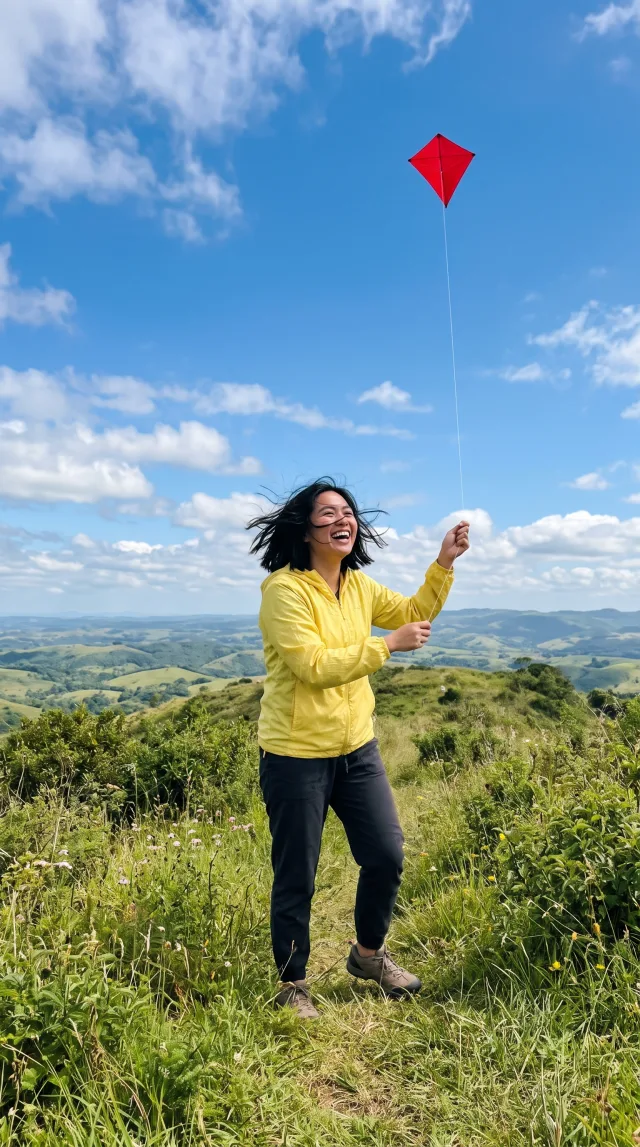
A red kite tugging at the string on a hilltop
A windy afternoon on a hill, caught as one photo. The sentence asks for the kite to climb and dip, for her to step back pulling the string, and for the camera to follow the kite up.
Our run kept the string tied to the kite as it dipped and drifted, and she leaned back pulling it. Two things missed: the camera stayed level instead of following the kite up, and she turned her back to the lens after the first second.
Move my photo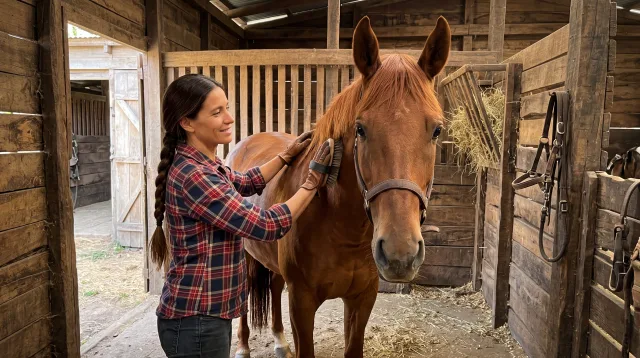
A chestnut horse that turns to look at her
She is brushing his neck in the stable. We asked for the brush to keep moving, the horse to turn its head and flick an ear, and dust to float in the light, with her face and his markings left alone.
In our run the brush kept moving, the horse turned its head toward her and moved its ears, and her face, her braid and his plain chestnut face held to the last frame. We couldn’t spot the dust in the light. Ours took 98 seconds.
Animate my animalHow do you use Kling 3.0 on a photo?
One photo of a tailor runs through all four steps. Upload it, write one sentence about what moves, pick 720p or 1080p, and press Make video.
- 1
Upload your photo
Kling 3.0 starts from a photo, from text, or from two photos that set the start and the end. On this page you add one photo; it becomes the first frame, so faces and colours start exactly as you shot them.
- 2
Say what should move
Name who moves, what they do, and what the camera does. One clear action fits a 5-second clip better than three.
- 3
Pick 720p or 1080p
Every clip is 5 seconds and silent. 720p is 175 credits; 1080p is 235, sharper on a large screen. Both prices sit on the button before you press it.
- 4
Save the MP4
Download it or find it in My Creations, where it stays for 30 days. If a clip fails or is blocked, the credits go back to your balance without you asking.
Set where the clip starts and where it ends
Kling 3.0 can take two photos: the first frame and the last frame. It fills the 5 seconds between them.
 First photo: a scuffed boot5 seconds in between
 Last photo: the same boot, polished
We took one photo of a dusty work boot on a cobbler’s bench, then a second of the same boot from the same angle, cleaned and freshly laced. The sentence was simply that the boot gets brushed and polished while the camera stays still. Two photos work in Create: pick Kling 3.0 and add both.
In our run a hand came in with a brush, the toe was shining after about two seconds, and the last frame matched the polished photo except for the hand still at the edge. It took 172 seconds, our longest Kling wait.
Same photo: Kling 3.0, Veo 3.1 Fast and MiniMax H3
The tailor photo and the same sentence, once per model. For Veo and MiniMax H3 we added a line asking for quiet shop sound, since both can make it.
Kling 3.0 at 720p
175 credits · 5 seconds · no sound.
Our run, 110 seconds: he swung the jacket round to the back and smiled, with his face, beard and the shop unchanged and the camera still. The hanger hook crossed his face once.
Veo 3.1 Fast

160 credits · 8 seconds · with sound.
Our run, 101 seconds: a wider, faster swing that blurred mid-turn while the camera moved closer, ending with the back of the jacket held to his chest and a broad grin. The sound came through at a normal volume.
Open Sound barely thereMiniMax H3

43 credits · 5 seconds · with sound.
Our run, 37 seconds: he turned the jacket and smiled over the collar with his face unchanged, but the jacket narrowed mid-turn, the hanger hook crossed his face, and the shop sound was almost silent.
OpenNeed sound? Switch the model
Kling 3.0 clips on this site are silent. Two models make the sound together with the picture, from the same photo.
Kling 3.0 and Kling 3.0 Omni
Kling’s own guides describe two models with the 3.0 name, and they do different jobs.
Kling 3.0
Turns text, a photo, or a start and end photo into a clip. Kling’s guide lists 720p and 1080p for each of those. This is the model behind the box at the top of this page.
Kling 3.0 Omni
VIDEO 3.0 Omni: All-in-One Multimodal Input, Voice-Driven Characters, Direct Audio-Visual Output, and Storyboarding
Kling’s own description. Omni takes up to 7 images at once and makes clips between 3 and 10 seconds inside Kling’s own app.
This page runs Kling 3.0, not Omni.
Can you try Kling 3.0 for free?
Not quite, and here is exactly what the free part covers.
Kling 3.0 questions
When did Kling 3.0 come out?
Kling’s own user guide for VIDEO 3.0 is dated February 6, 2026. It says the Kling VIDEO 2.6 model “has been upgraded to VIDEO 3.0”. We couldn’t find a separate release note from Kling with a launch day.
Is Kling 3.0 free?
No. A Kling 3.0 clip here is 175 credits at 720p or 235 at 1080p, and the credits come back if the clip fails. What is free is one MiniMax H3 clip: confirm your email and you get 43 credits for it.
What is Kling 3.0 Omni, and which one runs here?
Omni is the other 3.0 model in Kling’s own app. Kling says it takes up to 7 images and makes clips of 3 to 10 seconds, with “Voice-Driven Characters”. This page runs Kling 3.0, the photo, text and start-and-end model.
Why don’t Kling 3.0 clips here have sound?
We run Kling 3.0 silent and say so on the button. When the clip needs sound, use Veo 3.1 Fast (160 credits, 8 seconds) or MiniMax H3 (43 credits, 5 seconds); both make the sound along with the picture.
Can I choose how the clip ends?
Yes. Kling 3.0 takes a first photo and a last photo and fills the 5 seconds between them. Take both from the same angle so only the thing you want to change changes. Open Create, pick Kling 3.0 and add both photos.
Kling 3.0 or Veo 3.1: which should I pick for a photo?
Kling 3.0 gives you 5 silent seconds at 720p or 1080p. Veo 3.1 Fast gives you 8 seconds at 720p with sound, for 160 credits. On our tailor photo it was a tie: both kept his face and turned the jacket to its back. Veo swung it faster, with some blur mid-turn, and added sound; Kling kept the camera still.
How long can a Kling 3.0 clip be?
Here, 5 seconds each time. Kling says the model “generates up to 15 seconds of continuous video, with a flexible duration ranging from 3 to 15 seconds”; that is in Kling’s own app, not on this site.
Can I make it vertical for Reels or TikTok?
Upload a vertical photo and the clip comes out vertical, because the box on this page keeps your photo’s shape. To turn a wide photo into 9:16, or make a square 1:1 clip, choose the shape in Create.



Put your photo through Kling 3.0
Five seconds at 720p for 175 credits, or 1080p for 235. A failed clip gives every credit back.