GIF to MP4
Turn a GIF into a small MP4 that plays anywhere videos do. Choose the background for see-through parts and how many times it repeats; it all runs in your browser.

Coral fillThe sloth sticker’s clear parts are filled with coral, and the GIF becomes an MP4 that loops the same 4 seconds.
Post a GIF where only videos are allowed
Some post composers, ad tools and video editors only take video files, or keep just the first frame of a GIF. As an MP4 this chef keeps every toss of the wok, and the file went from 4.5 MB to 477 KB.
Pick one play for a feed that loops videos by itself. Where the video stops at the end, pick 3 or 5 plays so the moment has time to land.
Make a page with a big GIF load faster
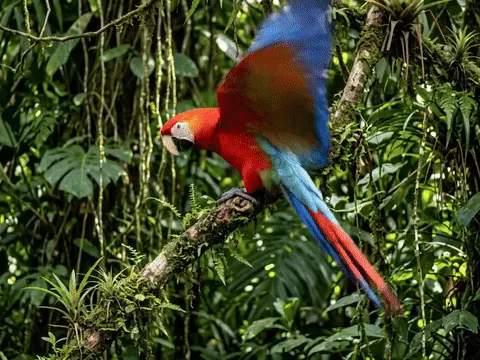
A GIF at the top of an article is often the heaviest thing on the page. This macaw weighed 4.8 MB as a GIF and 847 KB as an MP4: the same 48 frames, the same size, the same speed.
Set the video on your page to start muted and loop, and it plays just like the GIF did, while the words around it show up sooner.
Drop a cut-out sticker onto a colored slide
This sloth was cut out of its green background, so most of each frame is clear. A video can’t be clear, so we filled those parts with the slide’s own coral, and the sticker sits on the slide with no box around it.
Use the color picker to match any slide, banner or video background exactly. The 1.9 MB sticker GIF came out at 269 KB.
How do you convert a GIF to MP4?
To convert a GIF to MP4, drop the GIF into the box, pick a background color for any see-through parts, choose how many times the animation repeats, and download the MP4. It is usually far smaller than the GIF and plays wherever videos do. The GIF is converted in your browser and never uploaded.
- 1
Drop the GIF
Any animated GIF up to 100 MB. No GIF to hand? Try the sloth sticker: it has clear parts, so you can watch the next step work.
- 2
Pick a background
Clear parts need a color in a video. Take white, black or coral, or pick your own to match the page or slide it will sit on.
- 3
Choose the plays
One play is the GIF as it is. 3, 5 or 8 plays make a longer video for players that stop at the end.
- 4
Download the MP4
One file that opens on phones, in chat apps, in slide decks and in video editors. No account, and no watermark on it.

Choose what shows through the clear parts
A GIF can have clear pixels; a video can’t. The color you pick fills them in every frame. Here is the same sloth sticker four ways, with the size of each MP4.


Rough edges? Try a darker fill
This curly hair was cut out of a photo, and a few dark stray pixels still cling to the edge. On white they show as jagged specks. On black they disappear into the fill, and the hair looks whole again.
Want a cleaner edge first? Tidy the cut-out with the GIF background remover.
How much smaller the MP4 comes out
Four GIFs, each 480 pixels wide with 48 frames, converted with a white fill. The more of the picture that holds still, the more you save: the sneaker on a plain backdrop shrank by 97%, the macaw in a busy rainforest by 83%.
Sizes from our test run. Yours depend on how much moves in your GIF.
Make one play last longer
A GIF starts over by itself. Many video players stop at the last frame instead. Plays writes the animation into the video several times in a row, so it keeps moving without anyone pressing play.

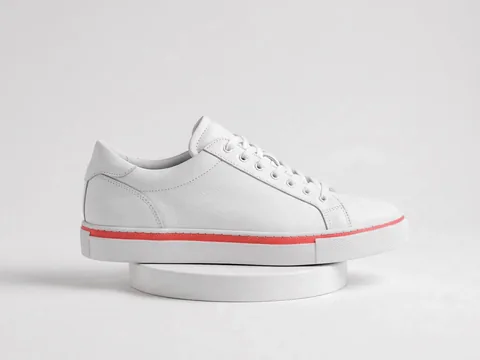 1 play4 s · 56 KB3 plays12 s · 166 KB8 plays32 s · 440 KB
Eight plays of the sneaker, 32 seconds of video, still come to 440 KB: about a quarter of the 1.7 MB GIF.
Why the video can be one pixel smaller
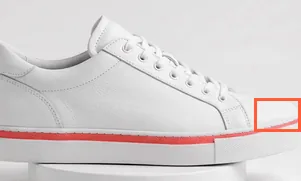
A video needs an even width and height, and plenty of GIFs aren’t. We cut this sneaker GIF to 301 by 181 pixels to show what happens.


The MP4 is 300 by 180. The last column and the last row are left out, so every other pixel stays exactly where it was. Squeezing the picture to fit instead would soften every frame a little.
GIF to MP4 questions
About fills, file size, length and speed. Going the other way, from a clip to a GIF? That is Video to GIF.
How do I convert a GIF to MP4?
Drop the GIF into the box at the top of this page, pick a background color for any clear parts, choose how many plays you want, then press Convert to MP4 and download the video. You don’t need an account.
What happens to the see-through parts of my GIF?
A video has no clear pixels, so they are filled with one color you choose: white, black, coral or any color from the picker. Choose the color of the page or slide the video will sit on and the edge disappears.
Why is the MP4 so much smaller than the GIF?
A GIF stores every frame as a separate picture. A video mostly stores what changes from one frame to the next. Our four test GIFs came out 83% to 97% smaller as MP4, and the ones with the most stillness saved the most.
Can I make the video longer than the GIF?
Yes. Set Plays to 2, 3, 5 or 8 and the animation runs that many times in a row inside one video, up to 2 minutes in all. The file grows with each play, but 8 plays of our 1.7 MB sneaker GIF still came to 440 KB.
Why is my video one pixel narrower than the GIF?
Videos need an even width and height. If your GIF is 301 pixels wide, the last column is left out, and the same goes for an odd height. Nothing is stretched, so the rest of the picture stays sharp.
Does the MP4 play at the same speed as the GIF?
Yes. Every frame keeps its own time from the GIF, so pauses and quick bits stay where they were. Frames set to less than 2/100 of a second are given 1/10 of a second, which is how browsers already show them.
Will the MP4 have sound?
No. A GIF has no sound, so the video is silent. Add music in a video editor, or in the app you post it to.
Where is my GIF converted?
Right here in this browser tab. The GIF is read and the video is written on your device, and nothing is sent to us. There is no sign-up and no watermark on the MP4.
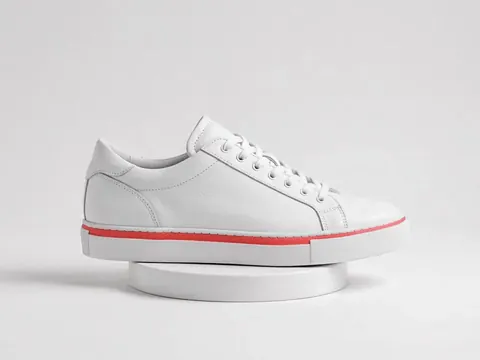


Want a video made from a photo?
Bring any photo to life as a short AI video, then save it as an MP4 or turn it into a GIF.