Which image to video AI is best? Two photos, seven models
The same two photos, the same prompts, every clip shown — what each model does well, where it slips, and what it costs.
There isn’t one best image to video AI: it depends on whether you need low cost, sound, or faces that stay true to the photo. In our runs Grok Imagine, the cheapest here, made two usable clips; Seedance 2, Veo 3.1 Fast and Wan 3.0 came back with sound you can clearly hear; and MiniMax H3, Kling 3.0 and Wan 3.0 kept the potter’s face closest. Every clip is below with its prompt and its credits, so you can judge for yourself.
Every clip is our own first take, shown as it came out · Updated 2026-11-14
 The photoMiniMax H3

How we tested
Two photos went into seven models: a potter shaping clay, to see hands and a face, and a horse by a fence in mist, to see quick movement and a busy background. Each photo got one sentence, word for word the same for every model.
Each model ran at its lowest setting on AnimatePhotos, so the length, sharpness and sound differ from model to model; the table says which. We kept the first clip each model made. Nothing was rerun or picked, so you see what a first try looks like.
To make the comparison fair, they’ll all be animating the same two starting images.
Why Try AI, on the same method
The potter: one photo, seven clips
The sentence every model got: “The wheel spins and her hands slowly raise the wall of the clay; she looks down at it, the shelves behind stay still.”

The photo
A potter at the wheel, hands on wet clay, shelves and a window behind her.
MiniMax H3
768p · 5 seconds · sound
In our run her hands stayed on the clay, one inside, one out, and the wall rose taller. Her face and the shelves held.
Open Closest to the photo175 creditsKling 3.0

720p · 5 seconds · no sound
In our run her hands stayed on the clay and her face held, but the pot barely grew. Ours took 140 seconds.
Open Face held173 creditsSeedance 2

480p · 5 seconds · sound
In our run her hands kept shaping the rim and her face held while the view slowly moved in close, which we didn’t ask for. Ours took 223 seconds.
Open Tallest pot160 creditsVeo 3.1 Fast

720p · 8 seconds · sound
In our run she pulled the pot up into a tall vase, then lifted her hands off and turned to the front, her face a little thinner. Ours took 96 seconds.
Open View drifted120 creditsHailuo 2.3

768p · 6 seconds · no sound
In our run the pot grew taller, but the view drifted, she leaned across the frame and her face looked less like the photo by the end. Ours took 251 seconds.
Open Pot rose, face held88 creditsWan 3.0

480p · 5 seconds · sound
In our run her hands raised the pot into a taller jar while her face and smile held. Ours took 98 seconds.
Open Pot rose33 creditsGrok Imagine

480p · 6 seconds · sound
In our run both hands raised the pot into a tall vase, but her face thinned and her smile faded by the end, and the sound was almost silent. Ours took 47 seconds.
OpenThe horse: the same test with fast motion
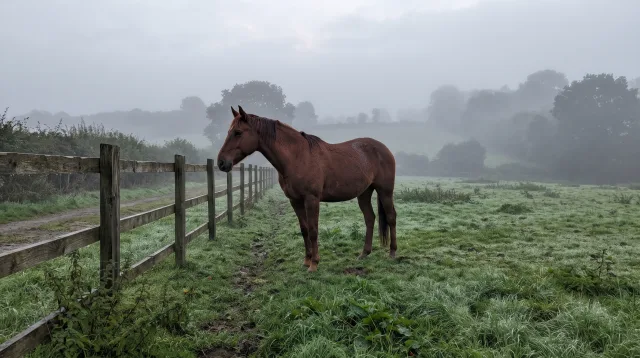
The sentence: “The horse tosses its head, trots two steps along the fence and the mist drifts; the fence stays still.” MiniMax H3’s take went wrong, so it sits in the next section with what to do about it.
 Trotted, no toss175 credits
Kling 3.0 · the horse
In our run the horse turned and trotted off along its side of the fence into the mist, with no head toss. Ours took 138 seconds.
Open Head dip, slow walk173 creditsSeedance 2 · the horse
In our run the horse dipped its head and walked a few steps along the fence toward us; it walked rather than trotted, and the fence held. Ours took 239 seconds.
Open Toss and trot160 creditsVeo 3.1 Fast · the horse
In our run the horse tossed its head, then trotted away along the fence as the view followed it. Ours took 113 seconds.
Open Walked out of shot120 creditsHailuo 2.3 · the horse
In our run the horse walked straight at the camera until its flank filled the frame, then left the shot, so the clip ends on an empty field. Ours took 223 seconds.
Open Walked by the rails88 creditsWan 3.0 · the horse
In our run the horse raised its head and walked toward us beside the fence while puffs of mist rose from the rails. Ours took 106 seconds.
Open Head toss33 creditsGrok Imagine · the horse
In our run the horse threw its head up high, then turned and stepped away along the fence with a swish of its tail. Ours took 55 seconds.
OpenMiniMax H3 walked the horse through the rails
We asked for a head toss and two trotting steps. In our run the horse walked instead, passed straight through the fence from the field side to the far side, and the view swung round as it went. It took 38 seconds.
When a model gets it wrong
Every model slips on some photos. Here is the clearest miss in our test, and four ways to make the next try land.
Say what can’t be crossed
Name the barrier and the side: “the horse stays on the near side of the fence.” Models don’t always treat a fence as solid.
One action per clip
A head toss and a trot in five seconds is two things. Ask for one, and the model has time to get it right.
Ask for a steady view
Add “the camera stays still” when the background matters. A swinging view makes any slip harder to forgive.
Switch models, keep the sentence
Same photo, same words, another model from the table. That is the fairest way to see which one suits your photo.
A run that fails or is blocked gives its credits back automatically. A finished clip you don’t like is still a finished clip.
All seven side by side
What each model ran at, what it cost, and what our two clips showed.
| Model | Our setting | Sound | Credits a clip | Did well | Slipped |
|---|---|---|---|---|---|
| MiniMax H3 | 768p · 5 s | Yes | 43 | Hands and face held on the potter | Horse walked through the fence; the view swung |
| Grok Imagine | 480p · 6 s | Yes | 33 | The pot rose into a vase; the horse tossed its head | Her face thinned by the end; the sound was almost silent |
| Wan 3.0 | 480p · 5 s | Yes | 88 | The pot rose and her face held | The horse walked rather than trotted |
| Hailuo 2.3 | 768p · 6 s | No, not from a photo | 120 | The pot grew taller | The view drifted and her face changed; the horse walked out of shot |
| Veo 3.1 Fast | 720p · 8 s | Yes | 160 | The pot became a tall vase; the horse tossed its head and trotted | She turned to face the front at the end |
| Seedance 2 | 480p · 5 s | Yes | 173 | Her face held; the horse moved its head and walked | The view moved in unasked; a walk, not a trot |
| Kling 3.0 | 720p · 5 s | Off; sound costs more here | 175 | Hands and face stayed true; the horse trotted along the fence | The pot barely grew; no head toss |
Settings differ because each model’s lowest tier differs; higher tiers cost more.
Pick by what you need
Four common reasons to choose one model over another, and which model our clips point to.
You want the most clips for your credits
Grok Imagine costs the fewest credits a clip here, 33, and MiniMax H3 is next at 43.
In our runs Grok Imagine made two usable clips: the pot rose and the horse tossed its head. Its sound was almost silent, though.
OpenYou want sound in the clip
Five of the seven ran with sound on in this test. Hailuo 2.3 has none from a photo, and Kling 3.0 ran silent.
In our runs Seedance 2, Veo 3.1 Fast and Wan 3.0 came back with sound you can clearly hear; Grok Imagine’s was almost silent. Which sounds right is your call, so play them with sound on.
OpenThe face has to stay the same
Faces are where viewers notice every change, so watch the potter wall first.
In our runs MiniMax H3, Kling 3.0 and Wan 3.0 kept her face closest to the photo, a three-way tie. Hailuo 2.3 changed it most.
OpenThere is fast movement
The horse wall shows who keeps up with a quick action and a busy background.
In our run Veo 3.1 Fast came closest: a head toss, then a real trot along the fence. Grok Imagine tossed the head but only stepped; Kling 3.0 trotted without the toss.
OpenWhich image to video AI can you try free?
On AnimatePhotos, verifying your email gives you enough credits for one clip with the default model, MiniMax H3, and that clip downloads without a watermark, the same as a paid one.
Adobe says of its own tool: “Yes, you can use the Adobe Firefly image-to-video tool for free with an Adobe account.” For any other service, check its own pricing page: free amounts change often, and we only repeat what a company says about itself.
Do you need an app? And how to compare for yourself
No app is needed for any clip on this page. AnimatePhotos runs in the browser on a phone as well as a computer: upload a photo, pick a model, and the clip plays and downloads right there.
To run your own comparison, use one photo you care about and write one sentence about what should move. Run it on two or three models without changing a word, and keep each first take. Then watch the hands, the face and the background, in that order, because that is where clips most often slip.
Image to video AI: what people ask
Is there a free image to video AI without a watermark?
Yes, on AnimatePhotos: the free clip you get for verifying your email has no watermark, and neither do paid ones. Other services set their own rules, so read each one’s pricing page rather than a list like this one.
Why do two models give such different results from the same photo?
Each model was built by a different team and makes its own guess about what happens next in the picture. The photo only shows one moment; the hands, the turn of a head or a horse’s step are all invented. In our test the same model kept the potter’s hands right and walked the horse through a fence.
Does a higher resolution mean better motion?
No. Resolution is how sharp each frame is; motion is how believable the movement is from frame to frame, and a model can be strong at one and weak at the other. In our potter test Wan 3.0 at 480p raised the pot and kept her face, while Hailuo 2.3 at 768p let the view drift and her face change.
Which model keeps a person’s face closest to the photo?
In our potter test MiniMax H3, Kling 3.0 and Wan 3.0 kept her face closest, with little to choose between them; Hailuo 2.3 changed it most. Whichever you pick, write “her face stays the same” into the sentence and check the clip at full size before you share it.
Can I use the clips in ads or client work?
Our terms say you own the photos you upload and the edits you make, so the clips are yours to use. You still need the rights to the photo and the permission of anyone in it. Adobe makes a different point about its own model: “The Adobe Firefly model is trained only on licensed content and public domain content where copyright has expired.”
How long are image to video clips?
Here, each model makes one length: 5 seconds for MiniMax H3, Wan 3.0, Seedance 2 and Kling 3.0, 6 seconds for Grok Imagine and Hailuo 2.3, and 8 seconds for Veo 3.1 Fast. Longer pieces are made by joining clips in a video editor.
Why did a model refuse my photo?
Each model checks photos and sentences against its own rules, and turns down things like violence or pictures of well-known people. The rules differ from model to model, so one may accept what another refuses. When a run is blocked here, the credits come back automatically.
Do I have to write a prompt?
On AnimatePhotos you write one plain sentence about what should move; it can be short. The effect pages, like AI Hug or AI Dance, give you ready-made sentences to pick from instead.
About this test
Tested 12 Nov 2026 with the model versions named above. Models change often, and we rerun this test when a version changes.
Keep going

Run your own photo through them
Upload a photo, write one sentence, and switch models to compare. MiniMax H3 is 43 credits a clip, and a failed run costs nothing.