How to make a cinemagraph
A photo where just one thing moves — lanterns, fish, a spinning wheel — and everything else holds still. Make one from a single photo, or the classic way from a video.
A cinemagraph is a still photo in which one small thing moves on a loop, like swaying lanterns or swimming fish, while everything else stays frozen. You can make one from a single photo: upload it, describe only the part that should move, say that everything else stays still, then loop the clip so it plays without a jump. The classic way is to film a short video on a tripod, freeze one frame and let the moving area show through a mask in a video editor.
Every example on this page started as one photo · Updated 2026-11-12
 The photoThe cinemagraph
What is a cinemagraph?
It sits between a photo and a video. Most of the frame is a frozen moment, and one small part of it keeps moving, over and over, with no start and no end. Your eye goes straight to the part that moves, which is why shops and magazines like them for a single product or a quiet scene.
The name was coined by the U.S. photographers Kevin Burg and Jamie Beck, who began posting them in 2011. They filmed short videos and froze everything but one detail. Today you can also start from a photo you already have and let only one thing in it move.
- A photo: nothing moves.
- A cinemagraph: one thing moves and the loop never ends.
- A video: everything moves, then it stops.
Cinemagraphs are still photographs in which a minor and repeated movement occurs, forming a video clip.
Wikipedia, Cinemagraph
Four cinemagraphs, each made from one photo
Same recipe every time: name the one thing that moves, then say everything else stays completely still. Each clip is our first take, not the pick of several.
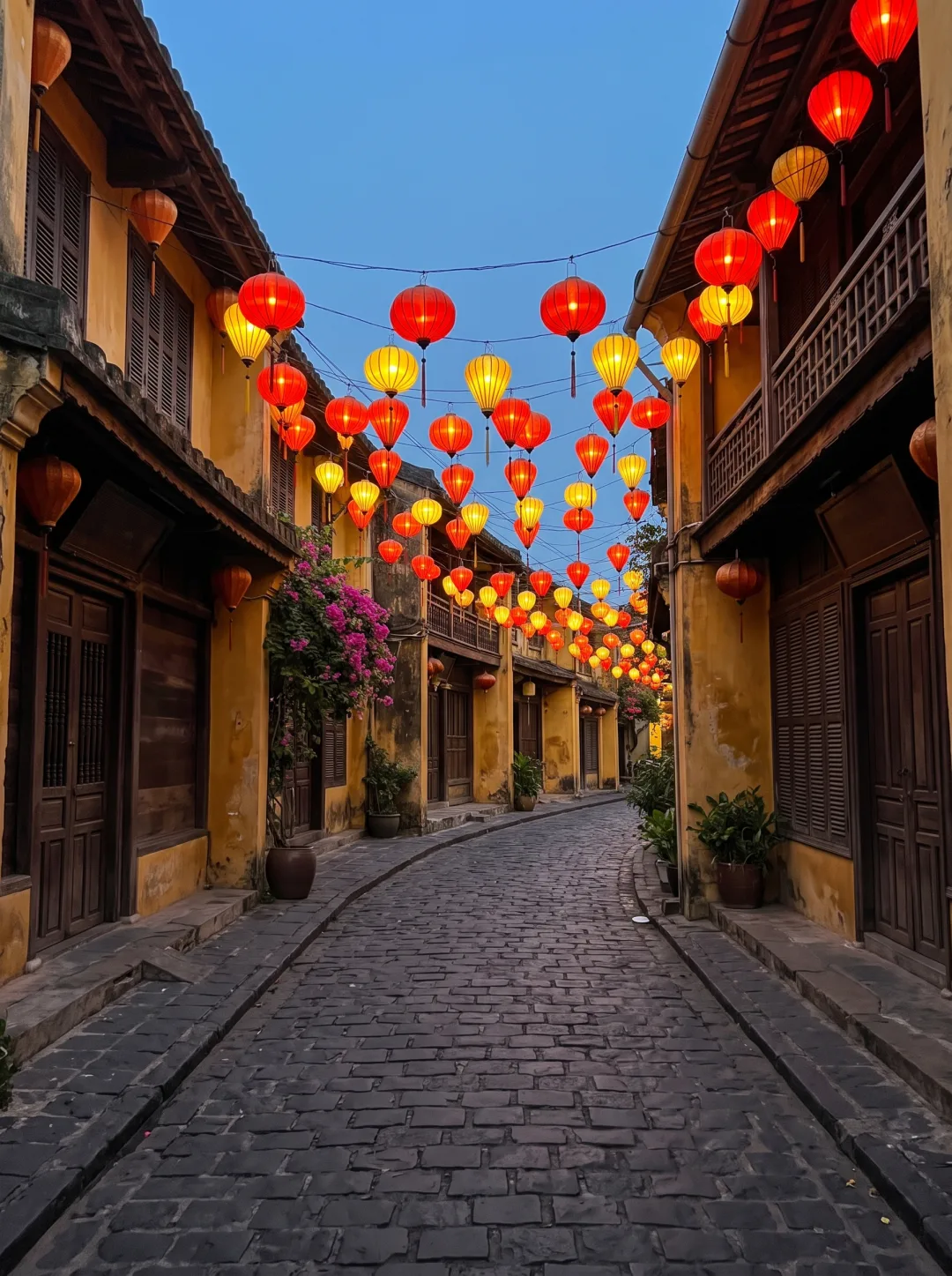
 Only the lanterns
What moves: the lanterns
Only the lanterns move: they sway gently in the breeze and glow softly; the walls, doors and street stay completely still.
In our run the lanterns swayed and glowed; the walls, doors and cobbles stayed put.
 Hands moved too
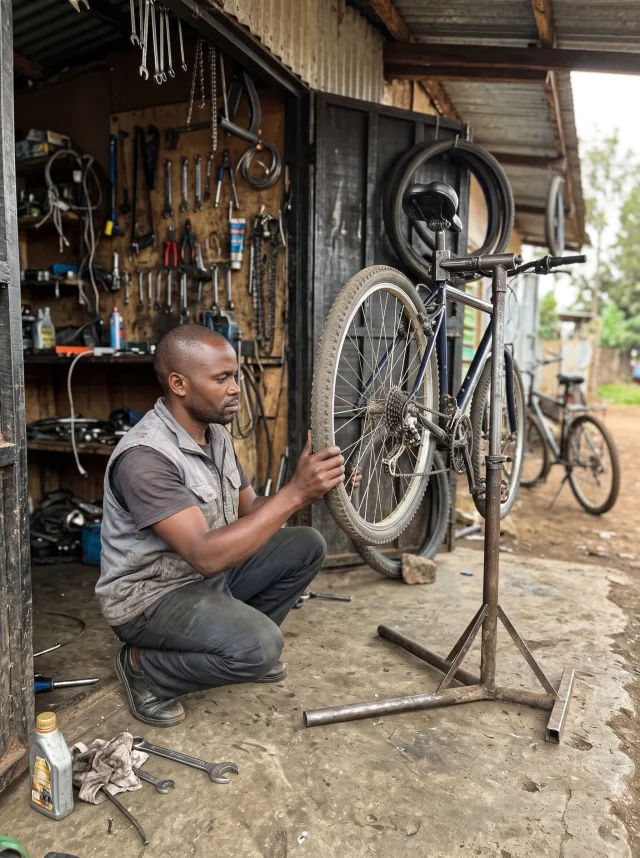
What moves: the back wheel
Only the back wheel moves: it spins steadily on the stand; the man and everything else stay completely still, like a photo.
The wheel spun, but his hands kept running along the tyre. The fix is further down.
 Man held still
What moves: the fish
Only the fish and the bubbles move: the small fish swim across the tanks and bubbles rise; the man stays completely still, like a photo.
Small schools of fish drift across the tanks while he stays frozen. The fish are tiny, so it is a quiet one.
 Dog stayed asleep
What moves: the curtain
Only the curtain moves: it lifts and falls in the breeze; the dog sleeps and stays completely still.
The sheer curtain billows in and out; the greyhound and the room never move.
How to make a cinemagraph from a photo
Four steps in your browser. No tripod, no editing software.
- 1
Pick a photo with one thing that could move
Water, fire, lights, fabric, a wheel, an animal’s tail. The rest of the picture should be sharp and calm, and any person in it should be someone who could hold perfectly still.
- 2
Describe only that motion
Fill in the gap: “Only the ___ moves; everything else stays completely still.” Then add how it moves, in a few words. Saying what stays still matters as much as saying what moves.
- 3
Check for anything else that drifted
Watch the clip once, looking away from the moving part: hands, hair, faces, the edge of the frame. Ours took 30 seconds, and the man behind the counter stayed frozen.
- 4
Make it loop and save it
Download the MP4, then play it forward and back as a GIF so the loop has no jump. Keep the MP4 for social apps and the GIF for web pages and chats.
We asked for the wheel alone
In our run the back wheel spun on its stand, but his hands kept sliding along the tyre as if he were turning it. His head and body held still, so it reads as a man fixing a bike, not as a frozen moment.
When something else moves too
A clip made from a photo can bring something to life you wanted frozen. Here is our bike shop, and what to do about it.
Name what must stay still
Point at the part that drifted by name: “his hands rest on the frame and do not move.” Each new try is a new clip and costs credits again.
Choose a pose with nothing to do
Hands touching the moving thing invite motion. A person with hands in their lap, or out of the frame, holds still far more easily.
Keep the quiet seconds
If the drift only happens for part of the clip, trim to the stretch where only your one thing moves before you make the GIF.
Paint it out in an editor
Put one still frame on top as a layer and erase a hole where the wheel is. Everything outside the hole is now truly frozen.
If a run fails or is blocked, the credits go back to you automatically.
Make it loop without a jump
Adobe’s guide puts it plainly: “the first and last frame of your video must be identical.” A clip made from a photo ends somewhere new, so a plain loop snaps back. Two ways round it.
Play it forward, then back
The free Video to GIF tool has a Forward and back setting: the clip plays to the end, then in reverse, so there is no cut. It suits motion that looks natural both ways, like a curtain lifting and falling or lanterns swaying.
OpenFade the end into the start
In a video editor, lay the first half second over the last half second and cross-fade them. It suits motion that only runs one way, like a wheel turning or water flowing.
The classic way: a cinemagraph from a video
Before photos could be brought to life, every cinemagraph started as a short video. It still gives you motion that was really filmed, at the cost of more gear and time in an editor.
Film a few seconds with the camera locked down, pick one frame to freeze, then let the moving area show through a mask. Adobe describes the masking step this way: “create a layer mask on your still image and block out the area of movement using the Brush tool.”
- Film on a tripod, so nothing in the frame shifts but the thing you want to move.
- Choose one frame and lay it over the whole video as a still layer.
- Erase a hole in that still where the motion should show, then trim the video so the first and last frames match.
You can use a tripod and shutter release cable to make sure the camera doesn’t move while filming.
Adobe, How to make a cinemagraph
From one photo or from a video?
| Compared | From one photo | From a video |
|---|---|---|
| Tripod | Not needed | Needed; the camera can’t move at all |
| Software | A browser | A video editor that does layers and masks |
| The moving part | Made by AI from the photo, not filmed | Filmed for real |
| Time to the first clip | Our four clips took 29 to 30 seconds each, plus trimming | Filming, then editing |
| Works with old photos | Yes | No, you need the scene in front of you |
What photo makes a good cinemagraph
Something that moves on its own
Lanterns, flames, water, fabric, leaves. Things the wind or the light can move look right moving forever.
A sharp, calm background
The still part is most of the picture. If it is blurry or busy, the one moving detail gets lost.
Room around the motion
Leave space for the moving thing to move into: a curtain needs air in front of it, a wheel needs clear spokes.
People who can hold a pose
An adult sitting or standing, hands at rest. Our mechanic had his hands on the tyre, and they moved with it.
Cinemagraph questions
Who invented the cinemagraph?
Wikipedia credits the name to the U.S. photographers Kevin Burg and Jamie Beck, who began making them in 2011. They filmed short clips and froze all but one small movement.
Should I save a cinemagraph as a GIF or a video?
A GIF when it has to play by itself on a web page, in an email or in a chat. An MP4 for social apps and anywhere file size matters, since a GIF stores every frame as a full picture. Video to GIF turns your MP4 into a GIF, and GIF to MP4 goes the other way.
Why does my cinemagraph jump when it loops?
Because the last frame doesn’t match the first, so the loop snaps back. Play it forward and back, or cross-fade the last half second into the first, as described above.
Do I need a tripod?
Only for the classic way, where any shake in the video shows up as the whole frame wobbling. From a single photo there is nothing to hold steady: the picture is already still.
What’s the difference between a cinemagraph and a Live Photo?
A Live Photo is a short moment around the shutter press, and the whole picture moves when you play it. A cinemagraph moves in one place only and loops without end. Our Live Photo guide shows how to turn one into a video or a GIF.
What does it cost to make one here?
Each clip from a photo is 43 credits with the default model. If the run fails or is blocked, those credits come back on their own. Turning the clip into a GIF with Video to GIF is free.
Can I make a cinemagraph from an old photo?
Yes. Repair scratches and fading first with Photo Restoration, and add color if you want it, then pick one thing to move, like smoke from a chimney or a flag. The guide to bringing old photos to life walks through the whole route.
Is the moving part real?
Not when it starts from a photo: the motion is made by AI from what is in the picture, so it shows how those lanterns could sway, not how they did. In a cinemagraph made from a video, the motion was really filmed.
About this page
Updated 12 Nov 2026: every cinemagraph on this page was made from a single photo on this site. Each is our first take, shown as it came out.
Keep going

How to animate a photo
When you want the whole picture to move, not one part.
Open
Turn a Live Photo into a video
Save it, loop it or bounce it on iPhone, then make a GIF.
Open
Make a GIF transparent
Cut the background out so the GIF sits on any page.
Open
Bring old photos to life
Repair, color and move a family photo.
OpenPick the one thing that moves
Upload a photo, name what moves and say the rest stays still. 43 credits a clip, and a failed run costs nothing.