Animate a photo with AI for free
What “free” means on six photo animators — how many clips, what quality, and whether there’s a watermark — checked on their own pages.
Yes. To animate a photo with AI for free on AnimatePhotos, verify your email and you get 43 free credits, enough for one 5-second 768p animation with sound and no watermark, and no card is asked. Most other free photo animators also hand out a small allowance after sign-up, but few say on the page how much it is, so the table below quotes what each one states.
Made on AnimatePhotos with the model and size the free credits pay for · Updated 2026-11-14
 The photo5 seconds, 768p
Animate photo free: what six tools say they give
A free photo animator is only as free as the line on its own page. Each cell below is that line in quotation marks, or a plain note that the page doesn’t say. We didn’t sign up elsewhere to count, and we didn’t guess.
| Compared | What’s free, in their words | Watermark on free clips | Card needed to start | What one clip costs |
|---|---|---|---|---|
| AnimatePhotos | One 5-second 768p clip with sound, once you verify your email | No | No | 43 credits, exactly the free allowance |
| animatephoto.io | Not stated on their page | Not stated on their page | “No credit card required — start animating for free.” | Not stated on their page |
| DomoAI | “Free to try, no editing skills needed.” | Implied: “watermark-free output on paid plans” | Not stated on their page | “DomoAI 2.5 at 10 credits per 5-second clip” |
| Monica | “Yes, you can get free quotas to use this AI Animation Maker after signing up.” | Not stated on their page | Not stated on their page | “4 animation generation credits will be deducted per use.” |
| Adobe Firefly | “Yes, you can use the Adobe Firefly image-to-video tool for free with an Adobe account.” | Not stated on their page | An Adobe account; card not stated | Mentions “free daily generations”, not how many |
| MyHeritage LiveMemory | “Anyone can try LiveMemory™ for free, for a limited number of videos.” | “a watermark labeled ‘AI’ is added” | Not stated on their page | “Users with a Photo plan can create 20 LiveMemory™ videos annually.” |
Checked 12 Nov 2026 on each tool’s own page; we’ll read them again in December. “Not stated” means we couldn’t find it there, not that it doesn’t exist. On our row the free credits divide into exactly one clip; on the others the free amount isn’t written down, so it can’t be worked out.
How to animate a picture for free
Three steps, about a minute of your time and half a minute of waiting. Ours took 30 seconds from button to clip.
- 1
Sign up and verify your email
Use Google or an email address. The free credits land the moment your email is confirmed: 43 of them, enough for one clip. Nobody asks for a card, and the credits don’t run out on a timer, so you can come back next week.
- 2
Upload one photo and write one sentence
Say who moves, what they do, and what stays still. One small action reads far better than three. The button shows the credits before you press it, so you know the free allowance covers it.
- 3
Download your clip
You get a 5-second MP4 with sound and no watermark. Save it soon: free results stay in your account for 30 days. If a run fails or is blocked, the credits come back and you can try again.
Before you spend your one free try
One free clip means the photo has to be a good one. These three show what to look for before you upload; we didn’t spend runs on the two weak ones.
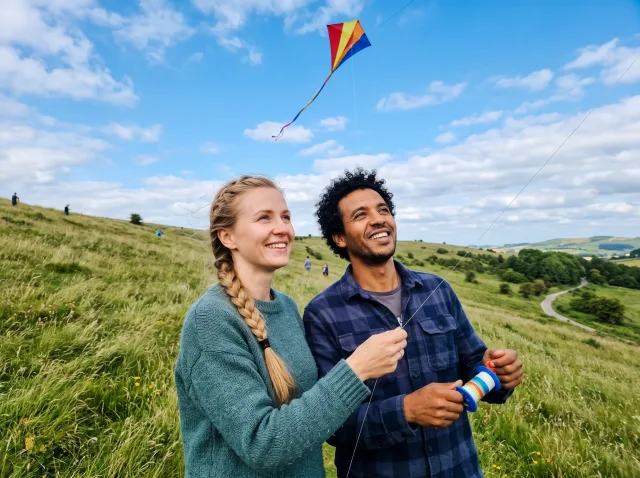 Use this
Faces big and clear
Both people fill the frame from the waist up, in daylight, looking roughly at the camera. There’s plenty of face to keep the same while they move, and the kite gives the motion somewhere to go.
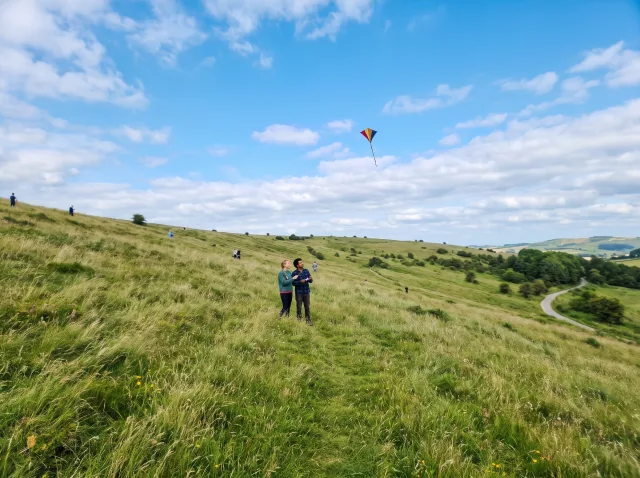 Skip this
People the size of a thumbnail
Same hill, same couple, shot from far away. With faces this small a tool has very little to hold on to, so they can smear or change once they move. Crop in first, or pick a closer photo.
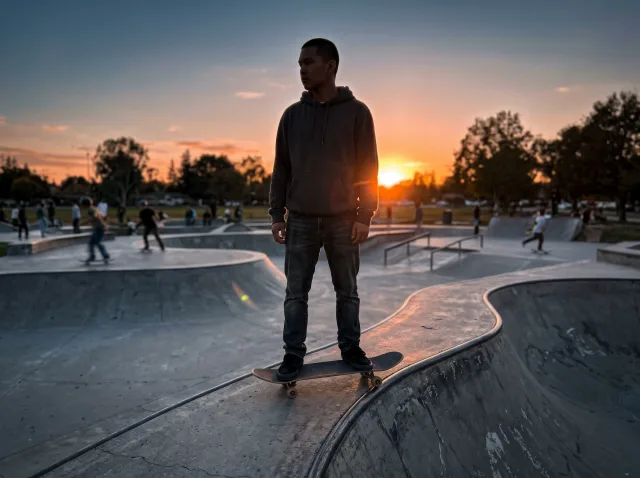 Skip this
A face lost against the sun
The low sun leaves his face almost black. Whatever moves, you won’t see it. Brighten the photo on your phone first, or use one taken with the light behind the camera.
Write one action, not three
The sentence is the other half of the free try. A line that asks for three things at once — wave, laugh, turn around and walk off — tends to come back with one of them done badly. One action, one place where it happens, and a word about what must stay still is the safer bet.
Ending with what shouldn’t move helps more than it looks. “The shelves and the shop stay still” kept the record shop calm in our run; leave it out and the background is free to drift.
- Too much: “She pulls out a record, dances, then walks to the till.”
- Better: “She pulls one record out of the crate and smiles; the shelves stay still.”
- Too vague: “Make it move.”
- Better: “He lifts the scoop of gelato toward the camera; the counter stays still.”

Free or paid, it’s the same clip
Here the free credits buy the same thing a paid run does: MiniMax H3, 768p, 5 seconds, with sound, and no watermark on either. The one difference our rules make is how long we keep it: a free result stays in your account for 30 days.
This is the gelato shop photo and the sentence we gave it: “He scoops one round ball of gelato and lifts it toward the camera; the counter and the other tubs stay still.” In our run he scooped a ball of yellow gelato and lifted it toward the camera, smiling, while the counter and the tubs stayed put. It took 30 seconds.
We haven’t yet placed a free run of this photo beside it, so we aren’t showing a side-by-side we didn’t make. Where a paid run does differ is choice: longer clips, 1080p and other models are paid only.
When the free credits run out
There are two ways to keep going, and the pricing page shows both with today’s numbers. A credit pack is a one-off payment, and its credits never expire, which suits anyone who animates a photo now and then. A monthly plan refills every month and works out cheaper per clip if you make several each week, but unused credits don’t carry over to the next month.
Either way, the button shows the cost before you press it, and a clip that fails or gets blocked hands its credits back on its own. Verified accounts can also collect a few free credits each day; those are for photo tools such as restoring or colorizing, not for videos.
- Now and then: the smallest pack on the pricing page.
- Every week: a monthly plan.
- Only photos, no video: today’s free credits may be enough.
Other ways to animate a photo without paying
Neither of these makes a new movement the way a photo animator does, but both cost nothing and can be the right answer.

Loop a Live Photo on your phone
If your phone shot a Live Photo, the motion is already there: the fish were swimming when you pressed the shutter. Set it to Loop or Bounce and share it as a video.
OpenA slow zoom in a free editor
A wide shot where the people are small works better as a gentle push-in than as a full animation. Free editors do this; we compared them in our main guide.
OpenQuestions about animating photos for free
Do I need a credit card to get the free credits?
No. Sign up with Google or an email address and confirm the email; the free credits are added then. A card is only asked for when you buy a pack or start a plan.
Will my free animation have a watermark?
No. A clip paid with free credits downloads with nothing added to it, exactly like a paid one. Just save it within 30 days, because that’s how long free results stay in your account.
Is the free animation lower quality than a paid one?
No. It uses the same model at the same size, 768p, for 5 seconds with sound. Neither one has a watermark. Paid runs add choices the free one doesn’t have, such as longer clips, 1080p or a different model.
Can the free clip be longer or sharper?
Not with the welcome credits: they cover one 5-second 768p clip on the default model, and that’s what the button shows. Anything longer, sharper or on another model is a paid run, and its cost appears on the button before you press it.
Do the daily free credits work for videos?
No. Verified accounts can press “Get today’s credits” once a day, but those credits only work in the photo tools, like restoring or colorizing a picture, and they expire at midnight UTC. Videos run on the welcome credits or on paid ones.
Do free credits expire?
The welcome credits you get for verifying your email don’t expire. The daily ones do, at the next midnight UTC. Results made with free credits are kept for 30 days, so download anything you want to keep.
Can I use a free animation on Instagram or TikTok?
Yes. It’s an ordinary MP4 with no watermark, so you can post it anywhere. Use a photo you have the right to use, and read our terms before putting it in an ad or handing it to a client.
What’s the cheapest way to keep going after the free try?
The smallest credit pack on the pricing page. It’s a one-off payment and its credits never expire. A monthly plan only makes sense if you animate photos every week.
Keep reading

How to animate a photo
Which photos move well, sentences to copy, and the free editors compared.
Open
Image to video AI, compared
The same photos run through several models, side by side.
Open
MyHeritage Deep Nostalgia, explained
What it does to an old photo and what it gives for free.
Open
How to make a cinemagraph
Let one thing move while the rest of the photo holds still.
OpenUse your free clip on a photo you care about
Verify your email, upload one photo, write one sentence. 43 free credits, no card, and the credits come back if the run fails.