Add snow to a photo
Turn any photo into a 5-second clip where real-looking snow falls through the scene and settles on hair and coats. Light flurries or a full snowstorm.
 MiniMax H3

SnowSteady snow · “Snow starts to fall over the whole scene, soft flakes drifting down and settling on hair and shoulders.”
Three kinds of snow on one street
Snow starts falling over the whole scene. How much is up to you: we gave the same dusk photo three sentences, and each sits under its clip.
Light flurries
A few light snowflakes start to drift down through the street, sparse and slow, catching the shop lights; one or two land on her hair and scarf.
Our run: she looked up and smiled, but the flakes were so few and small they barely show on a phone. Pick Steady snow if you want it noticed.
Steady snow
Snow starts to fall over the whole scene, soft flakes drifting down and settling on hair and shoulders.
Our run: flakes landed on her hair, scarf and coat, and the pavement began to turn white. Our pick for most photos.
Snowstorm
Heavy snow starts falling fast and thick over the whole street, big flakes swirling in the wind, the pavement turning white; she pulls her scarf up and laughs.
Our run: the street went white and snow piled on her hair and shoulders, while her face stayed clear.
How to add snow to a photo
Add a photo, pick how much snow, and press Let it snow. You get a 5-second clip where the flakes fall through the scene and land on people and things; our runs took 30 to 39 seconds.
- 1
Add a photo
An outdoor photo with some sky or open air in it. Street, park, garden, shopfront or an old snapshot.
- 2
Pick the snow
Light flurries, Steady snow, Snowstorm, or Turn it into winter to whiten the trees and ground as well. Or write how you want it.
- 3
Let it snow
43 credits with MiniMax H3, shown on the button first. Save the MP4, or turn it into a GIF or a Live Photo with our free tools in your browser. A failed clip gives the credits back.
A snow filter, falling snow or a whole winter?
A snow filter lays flakes over a still photo. Here the snow falls, and you choose whether the place changes too.
| Compared | Snow filter | Steady snow | Turn it into winter |
|---|---|---|---|
| What moves | Nothing; the flakes sit on top | Flakes drift down and land on hair and coats | Snow falls and the ground and trees go white |
| The place | Unchanged | The same, with a first layer of white | Turns into a winter scene with cooler light |
| Good for | A quick still | People, shops and pets you want to keep as they are | Summer photos you want to send at Christmas |
From summer to winter in 5 seconds
Turn it into winter does more than add flakes: the whole place changes season while the people stay put.
 A summer park benchTurned to winter
A man and an older woman on a park bench under green trees. In our run the trees, the grass and the ground turned white and the light cooled, and both of them stayed exactly as they were, still smiling at the camera.
Snow on a shop, and on a dog
Snow suits more than people. A shopfront and a pet both make a gentle winter clip.
Your shopfront
A lit window at dusk, no one outside. Good for a winter opening-hours post or a seasonal banner.
Our run: snow gathered on the sidewalk, the windowsill, the flower pots and the ledge over the door, and the blank signs stayed blank. The falling flakes are faint against the bright window, so pick Snowstorm if you want them to stand out.
Your dog in the first snow
A pet on the lawn, looking at the camera. The sentence asks it to look up at the snow and not shake.
Our run: snow dusted the leaves and the lawn, and the Shiba lifted its head to the flakes with its tail curled.
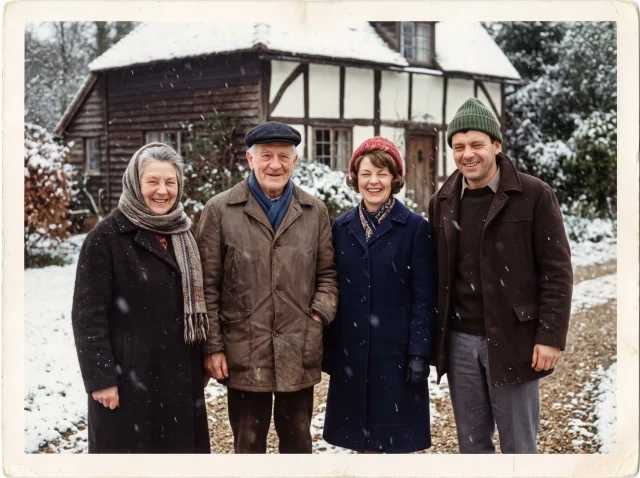
A winter visit from the 1960s
A faded family snapshot, already snowy, with a white border. We asked for the snow to keep falling.
In our run it thickened around the four of them, and the older man in the flat cap brushed it off his shoulder. The faded colours and the white border stayed, so it still looks like the print from the album.
Add snow to an old photoA sofa and a lamp, no window
It did what the sentence said: snow fell through the living room and settled on her bun and sweatshirt while she kept reading. Fun once, but not a winter photo.
When the snow ends up in the living room
We tried a photo taken indoors with the same sentence a user would pick. Here’s what came out, and what to look for instead.
Go outside
Streets, gardens, parks and doorways give snow somewhere real to fall.
Some sky or open air
Flakes need space between the camera and the people to fall through and be seen.
Not too dark
White flakes need light to catch. Dusk with shop or street lights works; a black night sky hides them.
If a clip fails or our safety check stops it, the credits go back to your balance on their own.
Adding snow to a photo: your questions
About cards, GIFs, faces and old photos. Plans and refunds are on the pricing page.
Can I add snow to a photo for free?
Once, yes. Confirm your email and your first clip is free and carries no watermark. After that each snowy clip is 43 credits, and a failed one costs nothing.
How do I add a snow effect to a photo for a holiday card?
Pick Steady snow or Turn it into winter, then save the clip. For a still card, tap Photo under the clip and save one moment; for an e-card or a message, send the clip or a GIF.
Can I get a GIF instead of a video?
Yes. Open the MP4 in our free Video to GIF tool, trim it and save. It runs in your browser, so nothing is uploaded again.
Will the snow cover faces?
Not in our runs. Even in the snowstorm, snow piled on her hair and shoulders and her face stayed clear. The Snowstorm sentence asks for faces to stay clear; add that to your own sentence too.
Can I add rain or falling petals instead?
There’s no rain or petal button here, but you can type it in Describe your own, for example “Light rain starts to fall over the whole scene”. We haven’t tried those sentences, so we can’t say how they turn out.
Why is it snowing inside the room?
Because the sentence says “over the whole scene” and the scene is a room. Use an outdoor photo, or say where the snow falls: “outside the window, behind her”.
Does it work on an old photo?
Yes. In our 1960s snapshot the snow thickened and the faded colours and white border stayed. Very small or blurry scans give the flakes less to land on, so use the sharpest copy you have.
Who can see my street photo and the snowy clip?
Only you. The snowy clip and the photo it came from wait in My Creations for at least 30 days unless you delete them first. We don’t use either to train models.

Let it snow on your photo
Light flurries to a full storm. 43 credits, and a failed clip costs nothing.